Choosing an industrial panel PC is not simply a matter of selecting the fastest processor.
Operating system compatibility, HMI software, industrial I/O, installation method,
environmental conditions, and long-term performance all influence which platform is
best suited to an automation project.
For many machine builders, system integrators, and factory automation projects,
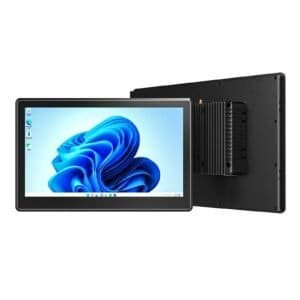
the 10.1-inch industrial panel PC provides an effective balance between
screen size, installation space, processing capability, and operator usability.
Emdoor IPC currently offers three 10.1-inch industrial panel PC platforms for different
application requirements:
EM-P10A,
EM-P10J,
and
EM-P10R.
This guide explains how their different Windows and Android architectures fit industrial HMI,
equipment control, smart manufacturing, and industrial IoT applications.

Choose P10A for performance:
Intel® Core™ i5-1235U makes it suitable for demanding Windows applications,
multitasking, advanced HMI, and industrial data processing.
Choose P10J for balanced automation:
Intel® N5100 provides sufficient x86 performance for mainstream HMI,
SCADA, equipment control, and production monitoring.
Choose P10R for Android projects:
Rockchip RK3568 and Android 12 provide an efficient ARM platform for IoT terminals,
kiosks, embedded interfaces, and smart equipment.
All three focus on industrial integration:
compact touchscreen design, industrial connectivity, front-panel protection,
and flexible installation simplify deployment into machines and control systems.
A Windows industrial panel PC is generally the better choice when
existing factory software, SCADA platforms, PLC tools, databases, or x86 applications
must be supported. An Android industrial panel PC is often better suited
to lightweight embedded applications, touch-centric interfaces, IoT terminals,
digital interaction systems, and cost-sensitive smart devices.
Why the Operating System Matters in Industrial Panel PC Selection
Industrial panel PCs are often deployed for many years, so software compatibility can be
just as important as processor performance.
Before selecting hardware, system integrators should determine which applications,
drivers, network protocols, and peripherals need to run on the device.
Windows platforms are widely used with HMI software, SCADA applications,
industrial databases, PLC programming tools, ERP/MES interfaces, and traditional
x86 enterprise software.
Android provides a lightweight application environment well suited to custom touch
interfaces, IoT dashboards, smart terminals, information systems, and embedded apps.
The selected operating system must also work with existing factory networks,
industrial peripherals, serial devices, displays, and application infrastructure.
When Should You Choose a Windows Industrial Panel PC?
Windows industrial panel PCs remain common in manufacturing environments because many
industrial control and enterprise applications are developed for the x86 ecosystem.
Within the Emdoor P10 Series, both P10A and P10J use Intel processors,
but they serve different performance requirements.
The
Emdoor EM-P10A
is powered by the Intel® Core™ i5-1235U, offering 10 cores,
12 threads, and turbo frequencies of up to 4.4 GHz.
This additional processing capability makes the platform particularly suitable when
the panel PC must run several applications simultaneously or manage more complex
industrial workloads.
Typical applications include advanced HMI systems, manufacturing data visualization,
machine management, multi-window control software, equipment diagnostics,
production monitoring, and industrial edge computing.
The
Emdoor EM-P10J
uses the Intel® Celeron® N5100 quad-core processor,
reaching up to 2.8 GHz.
For applications that do not require Core i5-level processing,
the P10J provides a more balanced platform for standard industrial software.
Suitable scenarios include machine HMI, SCADA terminals, PLC interfaces,
production status displays, warehouse workstations, equipment monitoring,
and industrial control panels.
When Does an Android Industrial Panel PC Make More Sense?
Not every industrial terminal needs Windows. For touch-first applications,
dedicated embedded software, smart equipment interfaces, and connected IoT devices,
an ARM-based Android platform may offer a simpler deployment path.
The
Emdoor EM-P10R
is based on the Rockchip RK3568 quad-core Cortex-A55 platform,
with CPU frequencies up to 2.0 GHz and Android 12.
The RK3568 platform also integrates a 1 TOPS NPU,
providing hardware support for lightweight intelligent or edge processing workloads.
The P10R is suited to industrial IoT terminals, smart factory interfaces,
self-service systems, access control, facility terminals, warehouse displays,
equipment dashboards, and customized Android applications.
P10A vs P10J vs P10R: Which Platform Fits Your Project?
The main differences between the three 10.1-inch panel PCs are computing architecture,
operating system, and intended workload.
| Feature | EM-P10A | EM-P10J | EM-P10R |
|---|---|---|---|
| Processor | Intel® Core™ i5-1235U | Intel® Celeron® N5100 | Rockchip RK3568 |
| Max Frequency | Up to 4.4 GHz | Up to 2.8 GHz | Up to 2.0 GHz |
| Operating System | Windows 11 | Windows 11 Home | Android 12 |
| Architecture | x86 | x86 | ARM |
| Screen | 10.1-inch | 10.1-inch | 10.1-inch |
| Resolution | 800 × 1280 | 800 × 1280 | 800 × 1280 |
| Front Protection | IP65 | IP65 | IP65 |
| Operating Temperature | -20°C to 60°C | -20°C to 60°C | -20°C to 60°C |
| Recommended For | Advanced HMI, multitasking, industrial edge computing | Standard HMI, SCADA, machine control | Android terminals, IoT, kiosks, embedded applications |
6 Factors to Check Before Buying an Industrial Panel PC
Processor and operating system are important, but industrial deployment requires
several additional considerations.
Confirm whether your HMI, SCADA, PLC, browser-based, or proprietary application
requires Windows, Android, x86, or ARM.
Basic machine control requires less processing power than multi-application
monitoring, visualization, edge processing, or industrial analytics.
Check the required USB, Ethernet, serial, HDMI, wireless, and expansion interfaces
before integrating the panel PC with existing machinery.
Bright factory environments require a display that remains readable under strong
overhead lighting and changing ambient conditions.
Dust, moisture, heat, cold, vibration, and long operating hours should all be
considered when replacing consumer computers with industrial hardware.
Verify whether the computer will be panel-mounted, embedded into equipment,
attached through VESA, or installed on an industrial mounting arm.
Typical Applications for 10.1-Inch Industrial Panel PCs
Compact 10.1-inch panel computers are particularly useful where installation space
is limited but operators still need a complete touchscreen interface.
Display operating status, alarms, machine parameters, and control functions directly
on industrial equipment.
Provide production personnel with real-time manufacturing status, process data,
quality information, and production instructions.
Integrate computing and touch interaction directly into electrical cabinets and
machine enclosures.
Support inventory management, production material tracking, order processing,
and warehouse information access.
Provide touchscreen interaction and network connectivity for connected machines,
IoT systems, facility terminals, and smart equipment.
Looking for additional screen sizes or configurations?
Visit the
Emdoor IPC Industrial Panel PC Series
to compare more industrial HMI and panel computer options.
Industrial Panel PC FAQs
Industrial panel PCs are designed for fixed industrial deployment and typically provide
more robust enclosures, industrial connectivity, wider environmental tolerances,
flexible mounting options, and longer operating cycles than conventional consumer PCs.
Windows is usually preferable when an HMI depends on traditional x86 software,
SCADA packages, PLC tools, or enterprise applications. Android can be more suitable
for customized touch interfaces, lightweight apps, IoT terminals, and embedded systems.
No. Core i5 performance is valuable for demanding multitasking and data-intensive
applications, but simpler HMI and machine-control systems may operate efficiently
on a lower-power processor such as the Intel N5100.
Typical installations include machine panels, production lines, control cabinets,
warehouse workstations, factory operator terminals, industrial kiosks,
and smart equipment.
Emdoor provides OEM/ODM industrial computing support for project requirements
involving hardware configuration, interfaces, connectivity, mounting,
and system integration.
Choosing the Right Platform for Your Industrial Application
The ideal industrial panel PC should match both today’s software requirements and the
long-term operating environment of the equipment.
For higher-performance Windows applications, the EM-P10A provides
greater processing headroom. For mainstream HMI and automation,
the EM-P10J offers a balanced x86 platform. For Android-based IoT,
embedded, and smart terminal applications, the EM-P10R provides
an efficient ARM alternative.
If you are planning an industrial automation or smart manufacturing project,
the final selection should be based on software architecture, I/O requirements,
environmental conditions, installation method, and future system expansion.
Tell Emdoor IPC about your HMI, automation, machine control, or industrial IoT project.
Our team can help evaluate processor, operating system, interfaces, mounting,
and customization requirements.