Industrial computers for utilities. Connected from field to facility.
Bring asset records, inspection tasks and service information closer to the people doing the work. Emdoor industrial PCs and vehicle computers provide hardware options for utility facilities, municipal service vehicles and infrastructure maintenance.
Start with the working environment and the information each team needs. A fixed control point, a maintenance vehicle and a field inspection task need different hardware.
01 / APPLICATION
Water & wastewater facilities
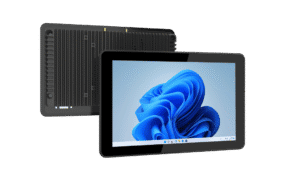
Use a panel PC as a local interface for pump status, maintenance records or an existing monitoring application. Define the installation enclosure, moisture exposure and required controller interfaces before selecting the hardware.
02 / APPLICATION
Municipal service vehicles
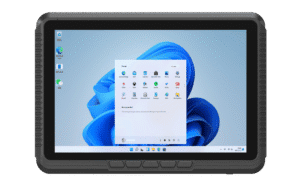
Put work orders, route information and asset histories within reach of service crews. A vehicle computer can support dispatch applications when mounting, power input and wireless coverage are validated for the fleet.
03 / APPLICATION
Infrastructure inspections
Support digital inspection forms, photographs and asset identification through your chosen software and compatible peripherals. Confirm outdoor readability, connectivity and the practical workflow for each inspection team.
SPECIFY WITH CONFIDENCE
Start with the requirements. Then choose the platform.
A useful specification connects the application to the real installation. Review these points before committing to a configuration.
Cab, wall, panel cutout or equipment enclosure; space for service access.
Environment
Expected temperature, water and dust exposure; verify the rating of the exact model and installed assembly.
Data & peripherals
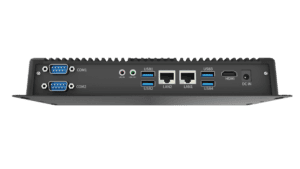
Serial or Ethernet links to site equipment; USB peripherals and wireless options where available.
Field continuity
Offline task handling and synchronization are application functions; test them with your service platform.
01Asset / sensor
02Local terminal
03Service application
04Maintenance team
Hardware provides the access point. Your monitoring or field service platform handles permissions, work orders, historical records and data exchange.
PRODUCTS FOR YOUR SHORTLIST
Compare your hardware starting points.
Explore a compact panel PC, an embedded box PC and a Windows vehicle terminal as starting points. Final suitability depends on the exact configuration and installation.
Bring the application, installation and deployment plan together. These resources help you move from a product shortlist to a practical project specification.
Software & integration
Review operating system choices, application compatibility and deployment considerations with your software team.
Practical answers for procurement, engineering and integration teams.
Which computer format fits a utility project?
Use a panel PC for an integrated screen at a fixed station, a box PC when the display is separate, or a vehicle computer for a service cab. Compare installation dimensions, operating conditions and peripheral connections before specifying a model.
Can the devices connect to an existing utility platform?
Integration depends on the operating system, interfaces, software requirements and any middleware. Share your application, protocol and peripheral list so the proposed hardware can be checked against the full workflow.
Are all models suitable for outdoor use?
No. Environmental ratings differ by model, and a front-panel rating does not describe the entire installed system. Check sunlight readability, temperature range, sealing, connectors and the enclosure for your site.
LET’S DEFINE THE RIGHT FIT
Plan your utility computing deployment.
Tell us the facility or vehicle type, application, environment and required interfaces. We will help narrow the hardware options.