5 Ergonomic Disasters: Why Are Consumer Devices Injuring Your Crew Instead of Rugged Tablets Windows 11?
Awkward hardware destroys warehouse productivity. Upgrading to rugged tablets windows 11 prevents wrist injuries. Equipment selection saves limbs.
Device mass dictates operator safety. Heavy batteries cause joint pain. Shift stamina plummets rapidly. Protect your team.
Smart procurement prevents occupational hazards. Enterprise buyers demand ergonomic solutions. Consumer hardware fails warehouse workers. Stop the damage.
Ergonomic hardware eliminates physical liabilities.
Evaluating Rugged Tablets Windows 11 for Worker Safety
Eye strain decreases barcode accuracy. Glossy screens reflect overhead lights. Glare causes severe headaches. Operators make mistakes.
Hardware shapes spinal posture. Forklift drivers twist their necks. Bad angles damage cervical discs. Ergonomics require attention.
Software interfaces impact cognitive load. Legacy menus confuse new hires. Modern platforms help. Windows 11 streamlines tasks.
Safety requires purpose-built hardware.
A rugged tablet prevents physical fatigue. Enterprise buyers demand better solutions. Consumer tablets lack proper handles. Workers drop them.
Hand straps stabilize device weight. Fingers relax during inventory scans. Grip tension decreases. This matters greatly.
Keyboard attachments fix posture issues. Data entry demands desk setups. Glass typing hurts wrists. Physical keys help.
Workers deserve comfortable tools.
The Performance Gap: Consumer Hardware vs. Emdoor Solutions
Evaluating enterprise hardware requires strict criteria. Specifications impact human health. Decision makers need data. Compare the facts.
- Screen Brightness: Dim screens damage retinas.
- Chassis Weight: Heavy plastics strain tendons.
- Processor Speed: Slow software causes frustration.
- Battery Swaps: Cables create trip hazards.
Tablets must survive harsh environments. The industrial pc market understands this reality. Factory floors present unique dangers. Equipment must adapt.
The differences remain clear.
| Feature Category | Consumer Devices | Emdoor Industrial Solutions | Operational Impact |
|---|---|---|---|
| Display Visibility | 300 nits | 650 nits High Brightness | Prevents eye strain |
| Processor Power | Mobile ARM | Intel 12th Gen i5/i7 | Reduces cognitive load |
| Keyboard Entry | Glass touch only | Removable physical keyboard | Protects wrist posture |
| Memory Capacity | 8GB fixed | Up to 64GB RAM | Eliminates software lag |
| ## Why Emdoor Sets the Ergonomic Benchmark |
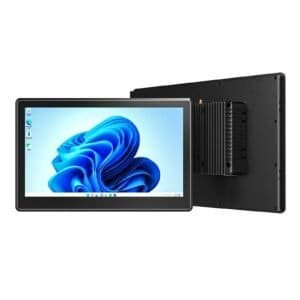
Emdoor prioritizes operator health. The EM-I20A model changes industry standards. Screen visibility protects eyes. Workers see clearly.
The 12.2-inch display offers 650 nits. Sunlight readability prevents squinting. Outdoor yards create harsh glare. Emdoor solves this.
Internal power reduces wait times. The Intel Core i5-1235U processor handles heavy software. Workers finish tasks faster. Speed reduces stress.
Performance improves shift morale.
Storage flexibility helps IT departments. The EM-I20A supports PCIe SSDs. Maintenance requires zero tools. Upgrades happen instantly.
Expandable memory handles future demands. Teams install 64GB RAM modules. Large blueprints open immediately. Frustration disappears completely.
The EM-I22J notebook offers hybrid flexibility. Tablet mode handles warehouse walks. Keyboard mode handles desk work. Posture remains optimal.
Hybrid designs prevent injuries.
The Intel processor delivers absolute reliability. Operations run smoothly. The 16:10 screen ratio displays more data. Scrolling decreases significantly.
Repetitive thumb movements cause injuries. The golden viewing field minimizes scrolling. Ten-point touch supports stylus input. Fingers avoid strain.
Emdoor understands manufacturing automation requirements. Workers need intuitive interaction. The removable keyboard connects instantly. Productivity doubles overnight.
Seamless transitions save time.
ROI Analysis: How Ergonomic Hardware Saves Money
Workplace injuries drain corporate budgets. Carpal tunnel claims cost thousands. Prevention saves capital. Invest in ergonomics.
- Medical Leave: Injured workers halt production.
- Device Replacement: Dropped consumer tablets shatter.
- Software Training: Legacy systems waste hours.
- Shift Efficiency: Comfortable workers move faster.
Implementing b2b rugged devices improves financial metrics. The EM-I20A outlasts consumer alternatives. Replacement cycles stretch further. Budgets remain intact.
Durability guarantees long-term value.
A proper ergonomic program requires correct hardware. The EM-I22J adapts to worker needs. Flexibility reduces physical complaints. HR departments notice.
Insurance premiums drop over time. Fewer claims mean lower costs. Emdoor devices protect your workforce. The math works.
Calculate your total cost. Hardware price represents one factor. Medical costs represent another. Choose wisely today.
Action prevents future liabilities.
Deploying Safe Hardware Today
Evaluating rugged tablets windows 11 demands urgency. Your operators face daily risks. Outdated hardware causes silent damage. Stop the cycle.
Review your current inventory. Identify heavy devices. Note screen glare issues. Talk to your team.
Emdoor provides evaluation units. Test the EM-I20A on your floor. Let workers feel the difference. Real feedback matters.
Schedule your Emdoor consultation today.