Machine builders need an industrial PC they can install, validate and reorder with the same behavior. A fast processor is useful only if the enclosure has room for the unit, its connectors reach the equipment, and the system recovers as expected. At Emdoor IPC, we start each selection with a mounting drawing and an interface list.
Define the operator interface and enclosure
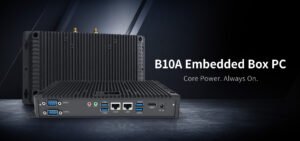
Where an operator works directly at the machine, an industrial panel PC can combine the HMI screen and computer in the same cutout. The EM-P10A is one example. Where a separate display or no local screen is required, an embedded box PC such as the fanless EM-B10A can sit inside the control cabinet. Verify the opening or mounting holes, access to service parts and the amount of space needed to bend and remove cables.
Write a port and power matrix
Name each connected device and its interface mode, physical connector and expected cable length. Record requests for separate networks, touch input, display output, USB peripherals and serial devices. For power, include the available supply and what the application should do after a loss and restart. Share the proposed wiring and controller models early so that we can review the exact PC and interface options.

Test in the enclosure with the production workload
Run the real application with the cabinet closed, at a representative ambient temperature and with other heat sources operating. Track whether the system throttles, drops connections or fails to restore the application after a restart. Test the target operating system, exact drivers, peripheral firmware and recovery image. If maintenance teams need to swap a unit quickly, let them carry out a replacement and restore during the pilot.
Record the approved configuration for repeat orders
Capture the model and options, software image version, accessory part numbers and what evidence is required for acceptance. Use that record as the purchasing baseline. Explore Emdoor IPC hardware, manufacturing applications and OEM and ODM configuration services. Send us your enclosure drawing and I/O list for a model review.